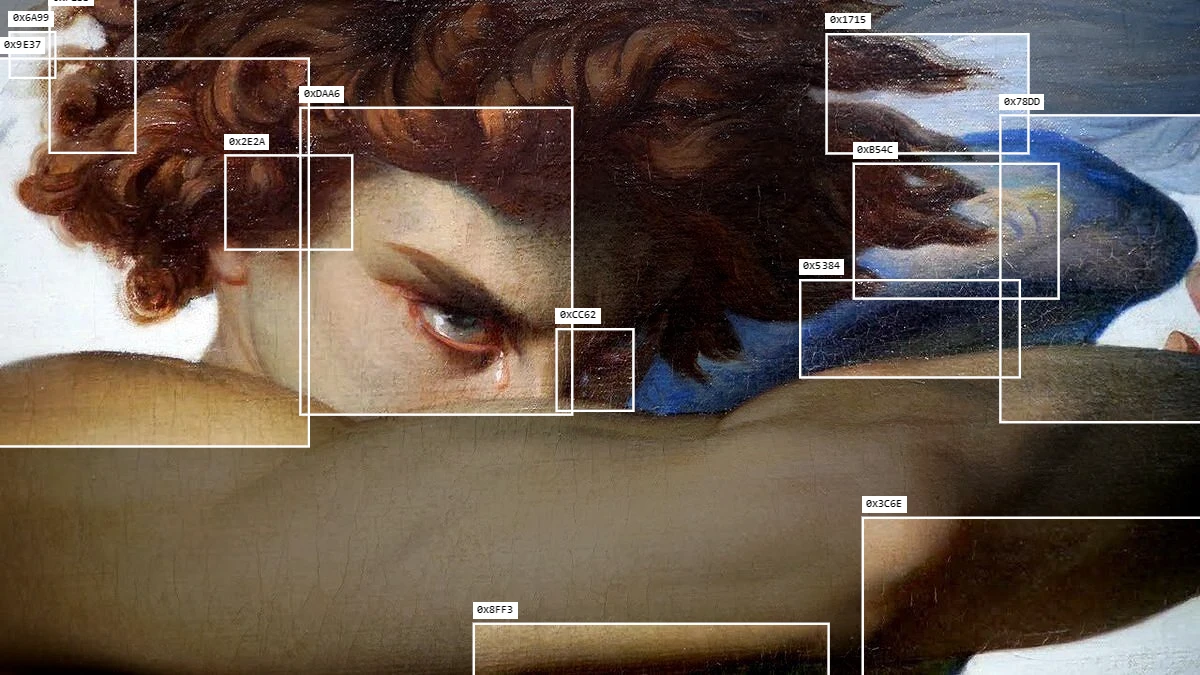
Blob tracking is a computer vision technique that finds "blobs" in a picture and follows them. A blob is any area that stands out: a bright spot, a moving hand, a patch of one color. As a visual style, it means drawing boxes, labels and connecting lines over those areas, so the footage looks like a machine is watching it.
You have probably seen it in music videos, fashion films and social posts. Thin white boxes jump between faces, lights and hands, each with a small number or code next to it.
How it works
- Find the interesting areas. The picture is checked for spots that match a rule, for example "brighter than this" or "moving".
- Group them into blobs. Nearby pixels that pass the rule are joined into one shape.
- Filter them. Blobs that are too small, too big or too many are dropped.
- Follow them over time. On video, each blob keeps its ID from frame to frame, so its box moves smoothly.
- Draw the overlay. Boxes, labels, lines between blobs and trails turn the data into graphics.
The rule in step 1 changes everything. Track bright areas and you follow lights. Track motion and you follow whatever moves. Track one color and you follow a red jacket through a crowd.
Why it became so popular
- It adds a story. Boxes and numbers make ordinary footage feel watched, analysed or digital.
- It reacts to the content. The overlay follows real things in the shot, so it feels alive, not pasted on.
- It is minimal. A few thin lines and small labels look clean and modern on almost any footage.
It started as a tool for interactive installations and creative coding, where artists used tracking to make visuals react to people. The overlay itself then became the look.
Blob tracking vs object tracking
They look similar, but they work differently:
| Blob tracking | Object tracking | |
|---|---|---|
| Finds | Spots that match a rule: bright, dark, moving, one color | Real things: people, cars, animals |
| Knows what it sees | No | Yes, with a label like "person" |
| Best for | Abstract, graphic overlays | Surveillance and machine vision looks |
Blob tracking is more of a design tool. Object tracking feels more like a real AI camera.
Where it looks best
- Night footage with lights, tracked as bright areas.
- Dance and street videos, tracked by motion.
- Crowds and city shots, where many boxes connect with lines.
- Product shots with one strong color, tracked by color.
Blob tracking in Dasca
The Blob Track effect works on photos, video and 3D scenes, right on your computer. Choose what to track (details, bright areas, dark areas, motion or one color), then style the boxes, labels and connecting lines. Turn on Show Mask while tuning to see exactly what is detected.
For real objects with labels, use Object Track. It recognises 80 kinds of everyday objects. See every control in the tracking docs.
For live shows, Dasca Node tracks your face, hands and body from a webcam in real time.