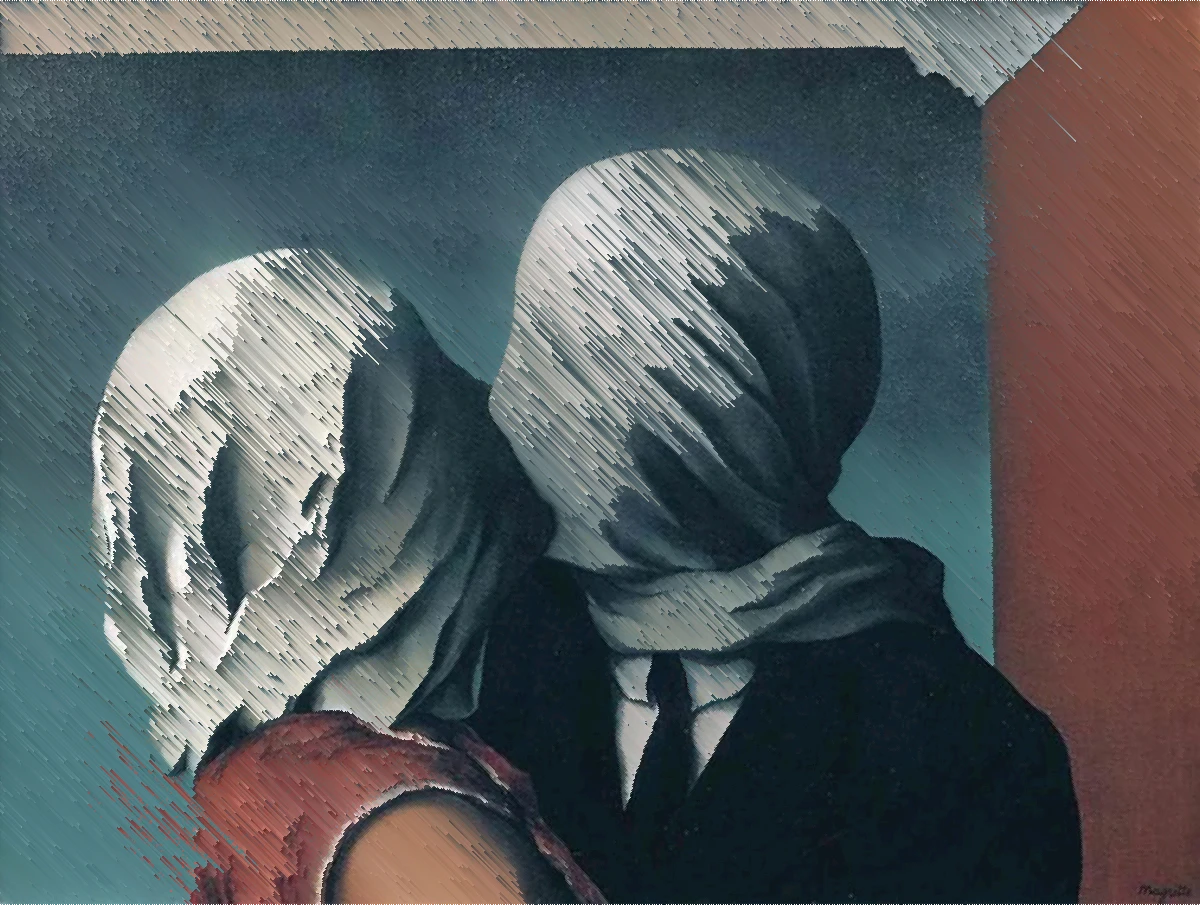
Pixel sorting is a glitch art technique that takes a row of pixels and puts them in order, usually from dark to light. The picture stays recognisable, but parts of it melt into long, smooth streaks. It looks like the image is dripping, or being pulled sideways by a strong wind.
How it works
The idea is simple:
- Take one line of the picture, for example one row of pixels.
- Find a run of pixels inside that line, often everything between a dark and a bright limit.
- Sort that run by brightness, hue or a color channel.
- Put the sorted pixels back and move on to the next line.
The pixels outside the run stay where they were. That is why faces and edges often survive while skies, skin and backgrounds turn into streaks.
Where it came from
Pixel sorting grew out of the glitch art scene around 2010. Artists shared small scripts that sorted images line by line, most famously the open-source ASDF Pixel Sort by Kim Asendorf. The look spread fast on album covers, posters and music videos, and it is still one of the most recognisable glitch styles today.
Unlike a broken file or a damaged stream, nothing actually fails. Pixel sorting is a deliberate process. It just happens to look like the picture came apart.
What changes the look
Three choices decide almost everything:
- Which pixels get sorted. Sorting only the mid tones keeps shadows and highlights sharp. Sorting between edges keeps outlines in place. Sorting whole lines melts everything.
- What they are sorted by. Brightness gives smooth light-to-dark ramps. Hue gives rainbow-like bands. A single color channel gives harsher, more digital streaks.
- Which way the streaks run. Vertical streaks feel like dripping paint, horizontal ones like speed or wind. Diagonal streaks add tension.
Streak length matters too. Long streaks feel dramatic, short and uneven ones feel more like texture.
When it looks best
- Portraits against a bright or plain background. The face holds while the background pours away.
- Skies and water. Smooth gradients sort into clean, long ramps.
- Night city shots. Lights turn into colored streaks.
- Album covers and posters, where one strong still image carries the whole design.
It looks weakest on busy, low-contrast pictures, where every line sorts into similar gray noise.
Pixel sorting in Dasca
The Pixel Sort effect works on photos and video, and every control above has a slider. You can set the brightness range, sort between edges, choose what to sort by, turn the direction with a handle on the canvas and limit the streak length. With Animate on, the streaks change over time, which works well on music.
For a full list of controls, see the Pixel Sort docs.
Similar looks
- Glitch simulates real broken files and streams.
- Keyframe Loss drags old pixels along, the look people call datamosh.
- Fluid bends the picture with liquid motion instead of hard streaks.